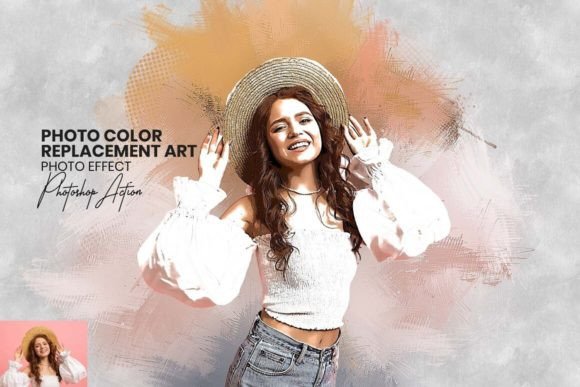
Transform Your Photos: The Art of Color Replacement
Every photographer and content creator hits a wall. You have a technically sound image—the lighting is decent, the composition is solid—but the color story feels flat or, worse, distracting. Perhaps the subject’s shirt clashes with the background, or the sunset lacks the warmth you remember. Historically, fixing this meant diving deep into complex masking and color channel adjustments. However, the landscape of digital artistry has shifted. We are moving away from tedious manual labor and toward intelligent, style-driven tools that prioritize artistic expression over technical drudgery.
Enter the Photo Color Replacement Art tool. This isn't just another filter; it is a comprehensive Photoshop action designed to bridge the gap between raw photography and digital painting. For designers, marketers, and hobbyists alike, this tool offers a distinct aesthetic that mimics the fluidity and texture of traditional watercolor, while giving you absolute command over the color palette. It is about taking a static image and infusing it with life, texture, and a cohesive visual narrative.
The Aesthetic: Beyond Simple Filters
When we talk about "Photo Color Replacement Art," we aren't discussing a simple hue slider. The visual characteristic of this tool is its ability to generate a high-definition, painted finish. Imagine taking a standard portrait and transforming it so that the skin tones blend seamlessly into a background that looks like it was wet-on-wet watercolor paper. The "personality" of this style is artistic, modern, and tactile. It avoids the plastic, over-smoothed look of typical smartphone filters, offering instead a textured depth that commands attention.
The appeal lies in the "one-click" efficiency combined with "professional-grade" results. In the fast-paced world of content creation, time is currency. This tool allows you to generate a unique visual asset in seconds. The resulting images have a distinct style that feels curated and intentional. Whether you are working on a vintage-themed lookbook or a vibrant, modern campaign, the underlying texture provides a consistent thread of sophistication. It turns a flat JPEG into a piece of digital canvas art.
Strategic Applications for Modern Creators
Understanding where to deploy this specific style is key to leveraging its full potential. The versatility of the Photo Color Replacement Art action makes it a powerhouse across various mediums.
Branding and Visual Identity
For small business owners and entrepreneurs, brand identity is everything. If your brand personality leans towards the organic, the artisanal, or the creative, this tool is invaluable. Instead of using generic stock photos that every other competitor has access to, you can transform standard images into proprietary artwork. This creates a distinct "brand texture" that aids in recognition. For example, a boutique bakery could use this effect on their ingredient photos to evoke a homemade, rustic feel, setting them apart from industrial competitors.
Digital Marketing and Social Media
On platforms like Instagram and Pinterest, the scroll-stop is the metric that matters. Standard photography often blends into the noise. However, an image that has been processed with a watercolor-style color replacement stands out immediately. It creates visual hierarchy in a cluttered feed. Marketers can use this to highlight specific products or call-to-action images. The "painterly" effect suggests that the content is high-value and crafted with care, which subconsciously increases audience engagement.
Editorial and Web Design
In editorial design, particularly for blog headers or magazine spreads, the goal is to set a mood instantly. This tool allows you to manipulate the color palette to match the typography or the overall layout of the page. If your design relies on a sans serif font for a modern look, the textured images provide a perfect counterbalance, adding warmth to the digital sterility. It is also excellent for "About Us" pages where you want to humanize the team with artistic portraits rather than stiff corporate headshots.
Practical Guidance: Integrating the Tool into Your Workflow
Adopting a new design asset requires a strategic approach. While the tool promises ease of use, maximizing its impact requires an understanding of context and compatibility.
Evaluating Project Fit
Before applying the action, ask yourself: Does this image have strong contrast? High-definition color replacement works best when there is a clear distinction between the subject and the background. While the tool handles background editing and color integration seamlessly, starting with a well-composed photo ensures the "digital painting" effect looks intentional rather than chaotic.
Mastery Through Customization
The package includes over 20 unique color adjustments. Do not just stick to the default setting. Use these adjustments to match the specific hex codes of your brand identity. If you are designing packaging, ensure the color replacement complements the product's physical color. The included Photoshop brushes and patterns allow you to refine the edges and textures manually. Use the brushes to soften harsh lines or to add emphasis to specific areas of the image, creating a focal point that guides the viewer's eye.
File Management and Integration
The tool comes with .ATN (Action), .ABR (Brush), and .PAT (Pattern) files. For a smooth workflow, load these assets into your Photoshop library once. When working on a large project, such as a website redesign or a print campaign, keep your "raw" and "processed" layers separate. This non-destructive workflow allows you to tweak the intensity of the effect. Perhaps a header image needs a heavy watercolor treatment, while a sidebar image needs just a hint of texture—layer management makes this possible.
Final Thoughts on Creative Potential
The barrier to entry for high-end digital art is lowering, but the demand for quality is rising. The Photo Color Replacement Art tool is more than a shortcut; it is a method for democratizing artistic style. It empowers graphic designers to experiment with new aesthetics without spending hours on manual painting techniques. It allows entrepreneurs to level up their visual content without hiring a full-time artist.
By embracing tools that offer high-definition finishes and intuitive controls, you free up your mental energy to focus on strategy and storytelling. Whether you are crafting a social media campaign, designing a logo, or simply exploring your creative side, this tool provides a reliable foundation for turning ordinary pixels into extraordinary masterpieces. It is a reminder that in the digital age, the canvas is infinite, and the palette is entirely yours to command.